define process --plain-english
Process
TLDR:There's a PDF on your desktop right now.
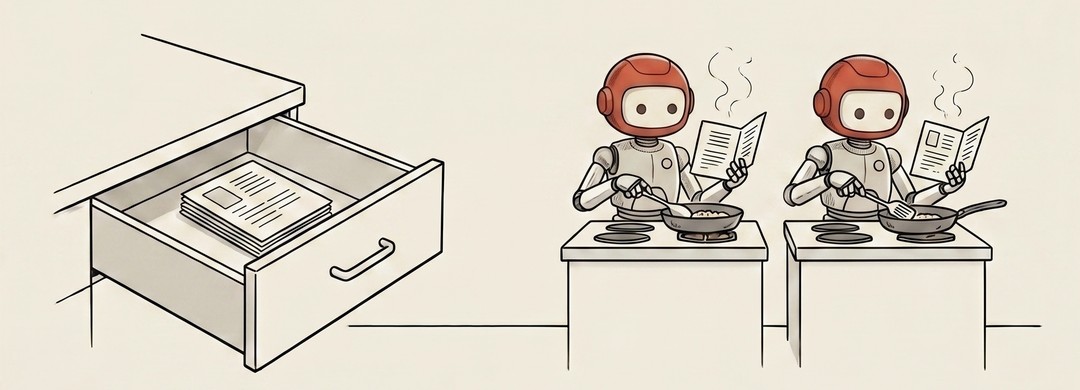
A file just sits there. A process moves.
There's a PDF on your desktop right now. It isn't doing anything. It's organized information waiting. The moment you double-click and your PDF reader opens it, that is a process. The app is live, using your computer's memory, using a slice of your CPU, doing something.
The same file can be the source of a dozen different processes at the same time, or none at all if it's never opened.
Think of a stage play. The script is the file. The performance is the process. The script exists whether anyone's reading it or not. The performance only exists while actors are actively doing something with it. Two theaters can run the same script at the exact same moment, and those are two separate processes.
Why this is worth knowing if you're building anything.
Your computer is running dozens of processes right now, none of which have a visible window. Background updaters. Security checkers. The thing tracking your keystrokes so the right letters appear on screen. Open Activity Monitor on a Mac and you'll see a list that's probably longer than you expected. Every item is a live thing using resources.
When something is slow or weird, the question "what processes are running?" is usually one of the first things a technical person asks. Not "what files do you have," but "what's currently alive and using resources?"
For AI agents, this matters because:
An agent isn't the instructions you gave it. The agent is the running instance (the process) executing those instructions in real time. If the process stops, the agent stops, regardless of whether the instructions still exist.
When you're running multiple agents at once, you're running multiple processes. Each one uses memory. Each one uses CPU. Knowing this is the difference between a workflow that stays stable and one that falls over when you add one more piece.
"Kill the process" sounds dramatic. It just means: stop the running thing. Not delete it. Not lose the file. Just end this particular performance. The script still exists. You can start a new one whenever you want.
File on disk: the script. Process: the performance. One is permanent. The other is alive.